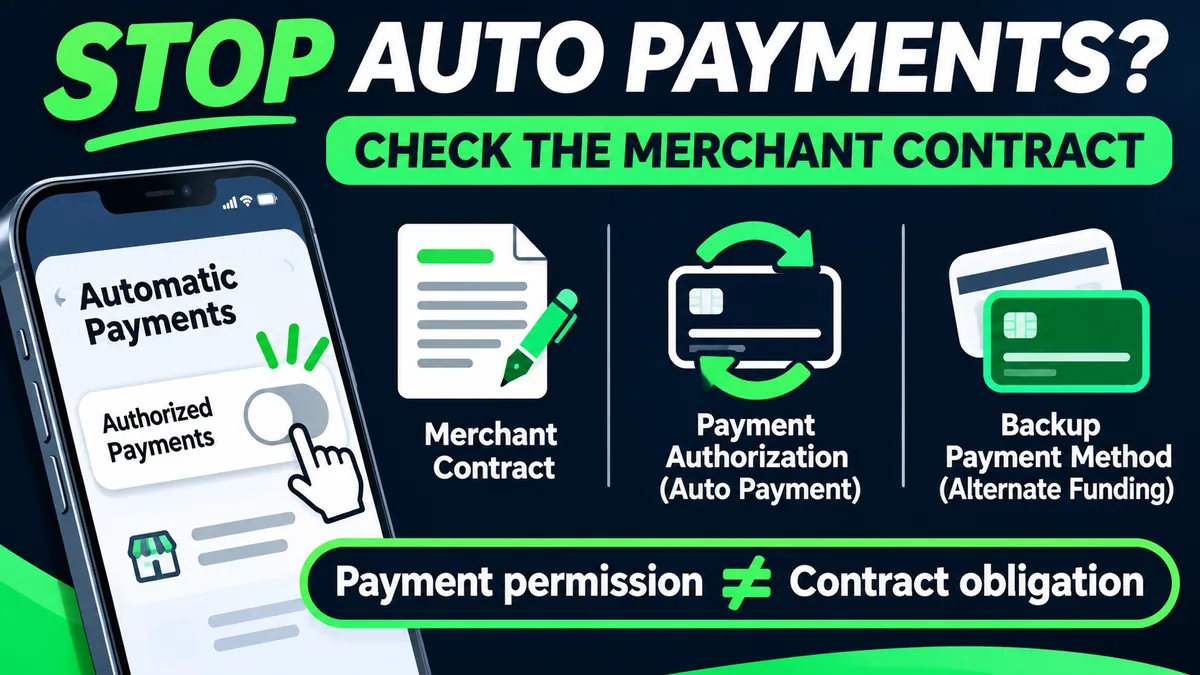
To stop a U.S. merchant's automatic PayPal charge, find that merchant under PayPal's saved businesses or automatic payments, cancel its payment authorization, and separately check the seller's subscription contract. Changing your general preferred card or removing a funding source is not the same as canceling a merchant-specific automatic payment. PayPal also describes backup funding for certain attempted charges. Most importantly, stopping PayPal permission may not cancel valid amounts owed under the merchant agreement.
Applies to: U.S. PayPal personal accounts and merchant automatic-payment arrangements, not every PayPal transfer, card charge, PayPal Pay Later loan, or business-account transaction. This guide compares PayPal’s published help and agreement; menu labels and contractual terms can change. Verify the current terms for your account and merchant.
Three separate records that determine what happens next
| Record | Where to verify | What it controls | What it does NOT establish |
|---|---|---|---|
| 1. Merchant contract | Seller's original agreement, cancellation page, final invoice | Service termination, any authorized final charge, remaining commitment, refund policy | Whether PayPal can still initiate a new automatic debit |
| 2. PayPal automatic-payment authorization | PayPal Settings → Payments → Subscriptions and saved businesses / Automatic Payments → merchant | Whether that merchant has saved authority to request future PayPal automatic payments | Whether the seller has accepted cancellation of the service contract |
| 3. Merchant-specific funding and backup | PayPal merchant payment details and applicable PayPal user agreement | Which account/card may fund an authorized charge, including applicable backup rules | Whether switching the default card alone revokes the merchant's authority |
These distinctions come from PayPal's U.S. automatic-payment help page and the PayPal U.S. User Agreement, automatic payments and payment methods sections. PayPal says the agreement may involve recurring, occasional, or future purchases; its merchant-specific preferred funding can differ from your overall PayPal preference. The agreement also warns that canceling payment permission does not necessarily remove amounts due to a seller.
The merchant-specific decision table
| What you want | Proof you need | Action | Risk if you stop too early |
|---|---|---|---|
| End both service and PayPal charges | Seller cancellation confirmation, PayPal merchant payment status | Cancel through seller's official channel and cancel applicable PayPal automatic payment; retain both records | Seller can still claim a legitimate unpaid balance |
| Keep service, pay another way | Merchant invoice and accepted replacement payment method | Arrange new method with seller; update or cancel merchant-specific PayPal authorization as appropriate | Service interruption or late fee if no alternative settles the bill |
| Keep PayPal but change its funding card | Merchant-specific funding choice in PayPal | Change payment method within that specific automatic-payment agreement | Changing your wallet's general preference might not change this agreement |
| Stop an imminent scheduled recurring payment | Next charge date, payment status and merchant identity | Review PayPal stop-payment instructions immediately; for qualifying U.S. personal-account recurring payments, PayPal's agreement specifies a three-business-day advance window | A very late request might not stop a charge already underway |
| Dispute a charge you did not authorize | Transaction ID, statement, original authorization details | Use PayPal's official transaction/reporting channels and, where relevant, contact the issuing bank/card promptly | Missing applicable dispute or reporting deadlines |
Reproducible cost test: two decisions, two outcomes
Every dollar amount below is hypothetical; it is not a PayPal fee, a real merchant quote, or a completed customer test. Assume a household is charged $18 per month through a merchant's PayPal billing agreement. The customer discovers the seller's written service term has three months left.
| Scenario | Illustrative calculation | Correct conclusion |
|---|---|---|
| A. Merchant confirms cancellation immediately with no remaining charges | 0 additional billed months × $18 = $0 scheduled future service charges in this example | Keep the merchant's zero-balance confirmation and ensure PayPal authorization no longer permits future automatic charges |
| B. Contract still requires three legitimate monthly payments after a premature stop | 3 × $18 = $54 in potential remaining scheduled charges | Canceling PayPal authorization may stop new PayPal automatic payments, but does not by itself establish that $54 is unenforceable or forgiven; confirm agreement and applicable law |
| C. You only switch the general default card | Monthly merchant charge still modeled as $18 | Inspect that merchant's PayPal funding selection and potential backup instead of assuming a wallet-wide setting stopped the agreement |
Worksheet formula: potential remaining scheduled amount = documented monthly contracted charge × remaining billed periods + documented required final charges − verified credits. Do not label the result as a debt until the merchant's actual contract, cancellation rights, payments already made and applicable law are checked. A charge can also be disputed as unauthorized or incorrect; that requires a separate evaluation.
Six actions to complete and document
- Identify the seller. Find the recurring transaction in your PayPal activity and match it to the seller's actual contract, invoice, and next due date; do not use links in suspicious invoice emails.
- Read the merchant agreement. Determine whether you are ending the service or just changing its payment method. Record notice deadlines, remaining installments, and any claimed final fee.
- Inspect the PayPal merchant entry. Sign into PayPal directly. Go to Settings → Payments → Subscriptions and saved businesses / Automatic Payments and select the seller. Confirm whether it is an active authorization and which funding method is assigned. Account menus can vary.
- Take the right action. If terminating the service, obtain a dated cancellation confirmation from the seller. If withdrawing PayPal automatic-payment authority, use the merchant-specific PayPal cancellation control and save the resulting status. If keeping the service, arrange replacement funding first.
- Address imminent payments. PayPal's U.S. agreement describes a three-business-day advance stop-payment rule for recurring automatic payments from personal accounts. Do not mistake business days for calendar days; check whether the item has already been processed. Contact PayPal through its official Help Center if unsure.
- Reconcile the following billing cycle. Compare PayPal activity, merchant invoice and bank/card statement. If a charge persists or a service remains due, contact the appropriate party, preserving time-stamped records. For suspected unauthorized activity, use dispute processes promptly.
What can change the result?
- Pending or preauthorized transaction: terminating authorization does not necessarily undo a purchase already authorized. Verify payment state before asserting it should reverse.
- Backup funding: the PayPal agreement provides for alternate funding under some circumstances. This does not mean every merchant payment must switch cards; verify which funding rule actually applies.
- Fixed-term subscription: a payment-block confirmation is not proof of a waived contractual balance.
- Seller already canceled the contract: merchant confirmation and a PayPal authorization record may be sufficient to show the intended two steps, even though bank statements still require monitoring.
- Non-PayPal ACH debit: a debit that goes directly from a bank account to the merchant does not follow the same PayPal merchant-settings path. Read our ACH payment authorization versus service cancellation guide instead.
Final evidence checklist
Keep these five items together: (1) the original merchant agreement, (2) most recent invoice and PayPal transaction, (3) seller's cancellation or payment-method-change confirmation, (4) PayPal automatic-payment status for that merchant, and (5) the next billing cycle's statement. Do not upload full account numbers or login credentials to an AI tool.
If you are unsure whether a renewal invoice is genuine, consult our fake renewal-invoice verification guide. For app-store rather than PayPal merchant billing, use Apple, Google Play or direct app-subscription cancellation routing. For a broader household cost inventory, use our subscription cost audit worksheet.
Official source record — reviewed November 16, 2026
- PayPal US Help: What is an automatic payment and how do I update or cancel one? — account menu, merchant-specific authorization and payment methods.
- PayPal US User Agreement — automatic payments, preferred/backup funding, timing and outstanding seller obligations. Review the applicable version when taking action.
- FTC Consumer Advice: Free trials, auto-renewals and subscriptions — check renewal terms and save proof of cancellation.
Example basis: The amounts are hypothetical and the arithmetic is shown so readers can substitute their own figures. Actual results depend on the merchant agreement, payment timing, account status, and applicable law.
Decision note: what a late stop-payment request means
For a covered recurring transfer from a U.S. personal account, PayPal describes a stop-payment instruction at least three business days before the scheduled transfer. If fewer than three business days remain, submit any appropriate cancellation promptly, but treat the next charge as uncertain: verify whether it is pending or already processed and keep the dated PayPal confirmation. This timing rule does not cover every PayPal payment, cancel the seller contract, or guarantee reversal of a transfer already underway. Check the current PayPal U.S. User Agreement and merchant-specific status.
Leave a Reply